Document Management System
Software (DMS)
Organize and find documents, collect information with custom forms, and automate approvals and e-signatures—all in one easy-to-use system.
Try for Free! Overview Video!- Search documents, including scans
- Automate approvals & signing
- Collect data & generate documents
- Control access & track activity
Secure Document Management Features for Compliance, Access Control & OCR Search
Secure Document Management
-
s 256-bit encryption256-bit encryptionThis secures your data by converting it into a code that only authorized users can decipher, ensuring it is safe from unauthorized access. For example, this level of security is used by banks to protect financial information.
-
s Two-Factor AuthenticationTwo-Factor Authentication2FA enhances your security by requiring a verification code from an authentication app, in addition to your password.
-
s SSL/TLS + IP restrictionsSSL/TLS + IP restrictionsSecure Sockets Layer connections encrypt the data transmitted between your browser and our data centers, ensuring that your information remains private and protected from interception. IP Restrictions add an extra layer by limiting where your account can be accessed from, giving you even more control over who can reach your documents — and from where.
-
s Custom password policyCustom password policyAdministrators can enforce custom password policies by defining rules for length, complexity, and expiration. Additionally, they can mandate the use of two-factor authentication to enhance security.
-
s Triple BackupsTriple BackupsThis ensures your data is redundantly stored across multiple locations, at least 100 km apart, for maximum safety and reliability. Even in the unlikely event of a failure at one site, your data remains secure and accessible.
-
s Recycle Bin only visible to account administratorsRecycle Bin only visible to account administratorsThis ensures that even if a user with delete permissions removes a file, it can still be reviewed and restored if needed. This adds an extra layer of security for all deleted data.
-
s SSO (Entra ID, Okta, Google)SSO (Entra ID, Okta, Google)This integration allows for centralized identity management, Single Sign-On, and robust security policies, ensuring that users can easily and securely access resources while administrators maintain control over user permissions and data protection.
OCR Search & Metadata
-
s OCR full-text searchOCR full-text searchContent indexing enables the conversion of scanned documents and images into searchable text. You can find documents based on their content, not just file name!
-
s Metadata filtersMetadata filtersUse the powerful filtering tools to refine your searches using metadata filters, custom metadata fields, date ranges, due dates, and more. This enables you to quickly locate relevant files based on specific criteria like project status, document type, or key deadlines.
-
s Custom metadataCustom metadataThis enables you to define various types of metadata fields, such as text, numbers, dates, and dropdown lists, for each document. This flexibility allows you to tailor data attributes to your specific needs, enhancing the organization, searchability, and management of your files.
-
s Link related files & foldersLink related files & foldersRelating resources allows you to connect files, folders, and external links within the system, creating a network of related documents and resources.
-
s Unlimited version historyUnlimited version historyVersioning ensures that every change made to a document is automatically saved, with no limit on the number of versions stored. When using Office 365 integration, versioning happens automatically.
Workflow Automation & Document Control
-
s Custom workflow automationCustom workflow automationCreate serial, parallel, or custom multi-step workflows using the visual workflow builder. Combine approvals, reviews, acknowledgements, electronic signatures, form completion, and scoring in a single workflow, with individual instructions and deadlines for each participant. Users can also request clarification before making a decision.
-
s Electronic signature (eSignature) workflowsElectronic signature (eSignature) workflowsSend documents for legally binding electronic signatures using Folderit eSign, or connect with DocuSign. Signature tasks can be combined with approvals and other workflow steps. Folderit also supports ASIC-E digital signing with ID-card, Smart-ID, and Mobile-ID in supported European countries.
-
s Policy acknowledgement workflowsPolicy acknowledgement workflowsDistribute policies, procedures, safety instructions, and other controlled documents for mandatory acknowledgement. Folderit records who has received, viewed, and acknowledged each document, providing a clear audit trail and workflow summary for ISO, regulatory, and internal compliance.
-
s Workflow templates & automatic triggersWorkflow templates & automatic triggersSave frequently used workflows as reusable templates and launch them without rebuilding each process. Workflows can also start automatically when a document is added to a folder, and completed documents can be moved automatically to another folder for the next stage of processing.
-
s RemindersRemindersReminders can be set for both users and groups, allowing you to schedule notifications with a custom message and a link to the relevant resource. Choose a date, time, and repeat option to keep everyone informed and on track with tasks like document reviews or policy updates.
-
s Automated document numberingAutomated document numberingAutomatically assign consistent document numbers using customizable schemes that can include counters, dates, static text, and metadata values. Different numbering rules can be configured for different folders and document types to support structured document control.
-
s Retention policy automationRetention policy automationSet automated schedules for how long files or folders should be kept before being archived or deleted. This can be customized on a per-file or per-folder basis, ensuring compliance with retention policies.
-
s Email-to-folder importEmail-to-folder importEach folder in Folderit can be assigned a unique email address. Send attachments directly to the chosen folder via email, saving the sender’s details, subject, and email content as metadata for easy organization and retrieval. Perfect for workflows like scanning to email, or when you need to quickly and securely store documents.
-
s Workflow history & summariesWorkflow history & summariesReview completed, pending, and sent workflows together with participant decisions, comments, timestamps, signatures, and clarification requests. Completed processes can include downloadable summary documentation for audit and compliance purposes.
Role-Based Access Control (RBAC)
-
s Preview-onlyPreview-onlyThis permission level allows users to view documents in-system without the ability to print, download, edit, or even select and copy text.
-
s Upload-onlyUpload-onlyThis permission level allows users to add new files to a designated location without the ability to view existing content. This feature is perfect for scenarios where document submissions are required without granting access to other sensitive files.
-
s Preview & downloadPreview & downloadThis permission level allows users to view documents, as well as print and download them.
-
s EditorEditorThis permission level grants users full control over the shared resource, including the ability to view, edit, delete, and manage files and settings.
-
s Granular (custom)Granular (custom)This allows precise control over user actions, such as toggling audit trail visibility, enabling online editing only, and restricting downloads or other activities. This flexibility ensures that each user’s access aligns perfectly with their role and the security needs of the shared resource.
Audit Trails, Dashboards & Reporting
-
s Dashboards & reportingDashboards & reportingMonitor organization-wide document activity through the admin dashboard, including duplicate files, pending workflows, retention deadlines, due documents, and a complete content overview. Users also have personal dashboards for incoming tasks, sent and pending workflows, and archived decisions. Reports can be exported to Excel, ODS, CSV, and PDF.
-
s Complete audit trailsComplete audit trailsAudit trails log every action taken on files, folders, and across the entire organization, whether by users or external parties. Each action is timestampTrack user and system activity across files, folders, workflows, and the entire organization. Each action is recorded with a timestamp and relevant user information, providing a reliable record for compliance, investigations, and internal monitoring. Audit data can be exported for reporting and review.ed for precise tracking. This data can be exported in various formats, including Excel, CSV, and PDF, for comprehensive reporting, compliance, and monitoring purposes.
-
s Shared access overviewShared access overviewView documents and folders shared with users, groups, and external recipients from one centralized overview. Administrators can review permissions, identify active public links, monitor access, and revoke sharing when it is no longer required.
-
s Notifications & watch updatesNotifications & watch updatesUsers can customize which notifications they receive and watch selected files or folders for changes. Alerts can cover document updates, workflow requests, approvals, signatures, reminders, sharing activity, and other relevant events.
Integrations, eForms & Document Generation
-
s Custom e-formsCustom e-formsCreate custom forms for things like incident reports, requests or registers. Users fill in fields instead of uploading a file, and each submission is stored as a structured record. These records are fully searchable and permission-controlled.
-
s Branches & subsidiariesBranches & subsidiariesCreate separate workspaces for each company or location. Each workspace has its own users, roles, and optional admins—so teams see only what they should. Switch in a click; security and audit trails stay intact.
-
s Microsoft Office 365 integrationMicrosoft Office 365 integrationThis built-in integration enables your users to create and edit Word, Excel, and PowerPoint files directly within the Folderit system.
-
s Outlook Add-inOutlook Add-inThis Add-In allows you to send selected emails directly from Outlook to any chosen folder in Folderit.
-
s DocuSign integrationDocuSign integrationStart DocuSign workflows directly within Folderit and automatically receive signed documents back into the system.
-
s Mobile and tablet friendlyMobile and tablet friendlyFolderit DMS is fully optimized for mobile and tablet use, providing a seamless experience across devices. Whether you’re managing documents, getting approvals done or accessing reports, you can enjoy intuitive navigation and full functionality on the go.
-
s Desktop appDesktop appFolderit Sync is a desktop app that syncs your files across your PCs, ensuring you have access to the latest documents both online and offline. It allows easy management of your files directly from your desktop, keeping your data synchronized and secure.
-
s Store & Embed URLsStore & Embed URLsStore and embed external URLs within Folderit, allowing you to open them in an iframe or a separate tab. These URLs can be linked to other items, include metadata, and be managed like any other document.
-
s WatermarkingWatermarkingDynamic watermarking feature adds an extra layer of security to your documents. Watermarks with details like the viewer’s name, date, and time are automatically applied during previews and downloads, ensuring traceability and discouraging unauthorized sharing. Available as a separate purchase.
-
s Template-based document generationTemplate-based document generationCreate PDF and DOCX documents from structured eForm data using reusable ODT templates. Generate contracts, certificates, invoices, HR documents, and reports, then store, download, email, or route them through workflows.
More sustainable and greener solution for document management.
Folderit’s secure document management system is available on AWS, where Amazon matches 100% of its electricity use with renewable energy, and on-premises with the same capabilities.
See what else we do as part of our Corporate Social Responsibility program.

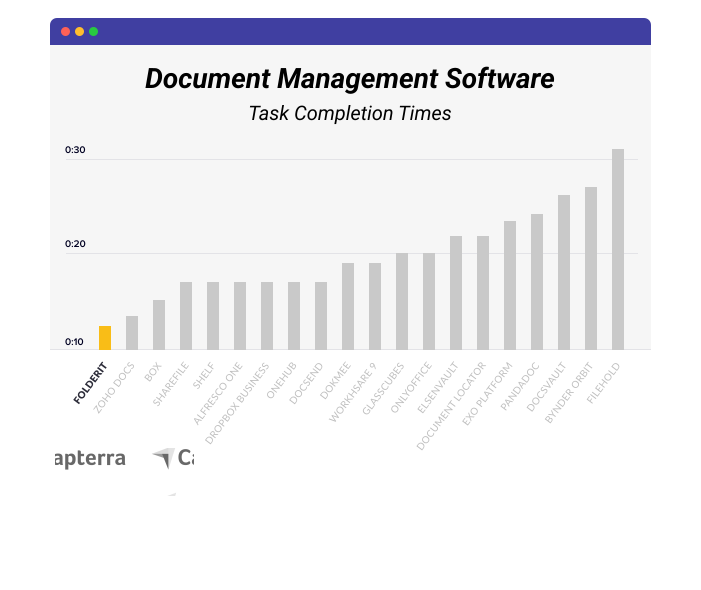
Folderit is the Most User-Friendly DMS in The World. Saving You Time and Money.
We care deeply about our customers and work every day to deliver a DMS software that is different in all the right ways: simple to use, reliable, and built for people who value security, privacy, and efficiency.
With our award-winning intuitive interface, you can organize, approve, and sign documents faster than with any other comparable document management software, making Folderit the ideal choice for teams moving toward a paperless workflow.
Try for Free!Trusted and Loved.
❤️ Worldwide.
Folderit DMS is easy-to-use, secure and affordable. This, in combination with our outstanding support team is exactly what our customers seek!

You’re in a good company.
Join thousands of organizations on Folderit.
Over 86 countries trust Folderit’s secure, cloud-based DMS to power paperless document management every day.
FAQs
DMS platforms like Folderit centralize files in a secure online repository, eliminating manual email exchanges and local storage bottlenecks. Real-time collaboration features—including check-in/check-out, version history, and automated notifications—streamline approval processes and reduce duplicate work, boosting overall team productivity.
A secure DMS must include granular permission controls, detailed audit logs (tracking who accessed, edited, or shared each document), and automatic retention policies. Look for ISO-27001 and GDPR-friendly architectures, plus easy export of compliance reports to simplify regulatory audits.
Yes. Folderit offers RESTful API for building custom integrations with CRM, ERP, productivity, and other business systems, including platforms such as Salesforce, HubSpot, SAP, Microsoft Dynamics, and Google Workspace.
Built-in integrations are available for Microsoft 365, DocuSign, Microsoft Entra ID, and Okta. Depending on the integration, documents and related data can be transferred automatically between Folderit and your existing systems, reducing manual uploads, downloads, and duplicate data entry.
Folderit’s flexible subscription plans start with the cost-effective Mini plan for small teams and scale to tailored Enterprise document management solutions with advanced workflow automation, configurable storage and user capacity, deployment options, and dedicated support. As your organization grows, your Folderit DMS plan can be adjusted to accommodate additional users, storage, and business requirements.
Every time a user saves changes, Folderit captures a new version—storing metadata (editor, timestamp, comments) for full traceability. Users can compare versions revert to prior drafts, and leave comments. Collaborative check-out/check-in locks prevent overwrite conflicts, ensuring your team always works on the latest document.